grails (11) vaadin (11) meteor (6) java (4) elasticsearch (3) apple (2) centos (1) cloudbees (1) google analytics (1) gradle (1) heroku (1) javafx (1) javascript (1) jdbc (1) jug (1) logback (1) logging (1) mac os (1) management (1) mongodb (1) mongolab (1) mysql (1) twitter (1) ubuntu (1)

Wednesday, November 21, 2012

Hello world in Grails and Vaadin

Download and install Eclipse STS and install the extensions. 

  1. Create new Grails project
  2. Fill in the name of the new project
  3. Try to run the application. The plain Grails application (without Vaadin) should start straight away without any additional configuration.
  4. This is how the started application should look like. 
  5. Install Vaadin plugin. This command will install the latest version of the plugin.
  6. Try to run the application (on this screen I have added option where I run the application on different port... it might be handy for you).
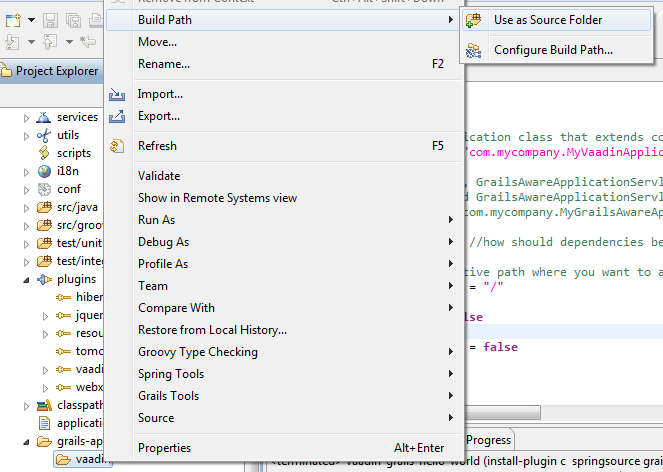
  7. Add Vaadin folder into the source folder list.
  8. Try to run the application again. You will see the Vaadin hello world.
  9. We are done. 
TextLab for Mac
Ultimate application to validate, clean and format JSON, XML, SQL, HTML.

Wednesday, October 3, 2012

Grails and Vaadin 7 beta - first version of the plugin

It is finally out. The first working version of Grails plugin for Vaadin 7.

Vaadin 7 differers from Vaadin 6 a lot and therefore there is no backward compatibility beween the plugins for 6th and 7th version. Actually, the plugin for Vaadin 7 is made almost from scratch. Many things have been simplified and plugin is just handling the connection between Grails and Vaadin. For example dynamic methods getBean and i18n are not injected anymore. 

One thing I have noticed after playing with Grails 2.2.0 and Vaadin 7 - it is fast (actually in two ways). First, I have made localized application with access to database via ORM (Hibernate) and Spring (Services), displaying list of users in a good looking table in just 5 minutes (sometimes, in other frameworks, I don't even setup the project in that short time). Second, it is really responsive user interface. I think the guys in Vaadin did amazing job with the 7th version. 

Let's have a look how to install the latest version and try it out. Setup Grails console before you start or you can just make it in your favorite IDE. 
  1. Create new project and run it.
    grails create-app bookstore
    cd bookstrore
    grails run-app
  2. You can stop the application now. It was just to verify that you have successfully created the project. Download and install the plugin
    grails install-plugin /path/to/plugin/grails-vaadin-1.7.0-beta2.zip
  3. And run the application
    grails run-app
Quite simple, right? You might be wondering... what about access to database or localization. There is a new class Grails and that one is meant to be used when you need to get the access to the services or i18n. Few examples follows.

Let's create a service class in Grails. It just returns all the users from the database.
class UserService {
   List<User> listUsers() {
      return User.list()
   }
}
Now get the service and call the method.
List<User> users = Grails.get(UserService).listUsers()

Or just create new Label and pass there localized string. 
String text = Grails.i18n("key.to.localization.from.i18n")
Label label = new Label(text)

If you find an issue, please report it in Jira or preferably in Github. 
TextLab for Mac
Ultimate application to validate, clean and format JSON, XML, SQL, HTML.

Grails and Vaadin 6 - few changes in the plugin

There are few changes in the plugin. You can find the changed Vaadin plugin under this version number 1.5.5. 
  • No configuration needed after the plugin installation. 
Previously we had to add a new class that extends Vaadin application, add a reference to VaadinConfig about that class and finally remove content of UrlMapping. This all is automated now. We just create Grails project install the Vaadin plugin and run the application.
  • Versions updated.

Grails updated to 2.2.0 and Vaadin to 6.8.4. 
Follow these steps in case you want to try it out. 
  1. First set Grails console
  2. Create new Grails project and try to run it (so we can verify successful creation of the project + dependencies are downloaded).
    grails create-app bookstore
    cd bookstrore
    grails run-app
  3. Download and install the plugin
    grails install-plugin /path/to/plugin/grails-vaadin-1.5.5.zip
  4. Run the application
    grails run-app

Friday, July 27, 2012

Trying to update Grails Vaadin plugin to Vaadin 7

I am quite in a shock. I have tried to update grails-vaadin plugin so I could use the new version of Vaadin 7.0.0alfa3 together with Grails 2.1.0. But what a surprise... alfa3 contains a bit more classes than previous version and it makes it imposible to integrate Vaadin 7.0.0 alfa3 with Grails 2.1.0. 

Have a look how size of Vaadin jars increased...

What does it mean. When I try to add com.vaadin:vaadin:7.0.0.alpha3 as dependency then Grails fails to load with the following error: 
Error Interactive mode exited with error: loader constraint violation: when resolving method "javax.xml.parsers.SAXParser.getXMLReader()Lorg/xml/sax/XMLReader;" the class loader (instance of org/codehaus/groovy/grails/cli/support/GrailsRootLoader) of the current class, groovy/util/XmlSlurper, and the class loader (instance of <bootloader>) for resolved class, javax/xml/parsers/SAXParser, have different Class objects for the type org/xml/sax/XMLReader used in the signature.

I have already complained about it http://dev.vaadin.com/ticket/9180. Let's see what happens with the next releases. I still hope it is a kind of a bug or bad joke that there are so many libraries included in the package. 

Here you can find working version of Vaadin 7 (alfa2) for Grails (it is still experimental version, but it worked for few people already): https://github.com/ondrej-kvasnovsky/grails-vaadin-plugin/downloads.

Tuesday, July 24, 2012

Hints for Grails app running on Cloudbees

Here are my most used commands I use during development and deployment of Grails application which is running on Cloudbees.

Dependencies when changing BuildConfig 

  1. It happens quite usually - you add a new dependency to BuildConfig and it is not visible in your code. This helps to load it. I am also using --include-source option to get jars (because I might be wondering what code is behind).
    grails refresh-dependencies --include-source

Testing during development

  1. I am not using integration tests. The are two reasons why. First, it is possible to mock everything. Second, integration tests requires context and it is time consuming when starting it up. 
    dev test-app unit:
  2. I usually run only one specific unit test when developing a feature.
    dev test-app unit: UserServiceTests
  3. From time to time I need to have more applications running at the same time (e.g. when doing an integration between client application, admin application and some web services). 
    dev run-app -Dserver.port=8080

Validation before deploying war into the production

  1. At first, run all the tests. E.g. my web services written in Grails have 95% line coverage, applications about 80%. So I am quite confident when deploying it to production. 
    test-app
  2. Simulate running the war on local machine. Running application by run-war might uncover some issues which could occur during deployment of war on cloud. It can happen that application is running well when it is started by run-app but it fails during deployment (which causes your production app is not available). 
    run-war
  3. After the steps above are without problems then I make a production war file.
    prod war
  4. It is necessary to install CloudBees SDK so the applications can be deployed from command line. 
    bees app:deploy myapp.war -a myaccount/myapplication
  5. This is how to restart application from command line... it is quite handy. bees app:restart myaccount/myapplication

Wednesday, May 2, 2012

How to install Gradle on Mac OS


  1. Open http://gradle.org/downloads and download zip file containing binaries
  2. Move content of zip to e.g. /Users/xxx/Installations/gradle (you can choose what ever directory you like...). 
  3. Open console and add system variable:
    vi ~/.profile
    Copy paste the following text into the .profile file:
    GRADLE_HOME=/Users/xxx/Installations/gradle;
    export GRADLE_HOME
    export PATH=$PATH:$GRADLE_HOME/bin
  4. Test it in console
    gradle -version
    You should see something like this: 
    ------------------------------------------------------------
    Gradle 1.0-rc-3
    ------------------------------------------------------------

    Gradle build time: Sunday, April 29, 2012 11:51:52 PM UTC
    Groovy: 1.8.6
    Ant: Apache Ant(TM) version 1.8.2 compiled on December 20 2010
    Ivy: 2.2.0
    JVM: 1.6.0_31 (Apple Inc. 20.6-b01-415)
    OS: Mac OS X 10.7.3 x86_64


TextLab for Mac
Ultimate application to validate, clean and format JSON, XML, SQL, HTML.

Tuesday, March 20, 2012

Vaadin and Grails, part II., "What is in the package?"


Let's have a look at what makes mixture of Grails and Vaadin so great tool that one should use it. 

Vaadin - first of all, this is awesome framework combining server and client side approach. We can make RIA just in plain Java without touching JavaScript, HTML or CSS. This is nice showcase. If you want to, you can add there your HTML, CSS or JavaScript and change default look & feel and behavior.

Grails - another framework which is setting quite high standarts for development of Java based applications. Grails gives us: 
  • Command line scripting environment built on the Groovy-powered Gant
  • Object Relational Mapping layer built on Hibernate (GORM)
  • View layer in Groovy Server Pages 
  • Controller layer built on Spring MVC
  • Embedded Tomcat container which is configured for on the fly reloading
  • Dependency injection with the inbuilt Spring container
  • Support for internationalization (i18n) built on Spring's core MessageSource concept
  • Transactional service layer built on Spring's transaction abstraction
We don't need these two features of Grails - "View layer in Groovy Server Pages" and "Controller layer built on Spring MVC" when using Vaadin. Both of these features are replaced by Vaadin components and listener pattern.

Let's have a look at how the remaining features are used together with Vaadin and how to benefit from that. 

Command line (Gant)
This is awesome, we can... 
  • run application or tests in different environments simply just by typing dev run-app or test run-app or test test-app.   So we can use different databases, test data or whatever we want to in certain stages of development process.  
  • make a production package with the following command prod run-app  

... and many others. Here is more info about command line.

Tomcat
Well, we just change a code, save the files, refresh a page and that is it. No server restarts needed. We can see the changes immediately. 

Also, tomcat is provided as a grails plugin. So when we want to upgrade a new version of tomcat, we just upgrade the plugin and the compatibility with grails comes really easily. 

Internationalization
There is i18n() method available in all Vaadin classes which makes localization pretty easy. We just type i18n("app.title") in your Vaadin code.  

Then you should create a record in i18n properties files. 

And we are done. Just start the application by typing dev run-app into the command line or refresh the page in case your application is already running. 

If the message doesn't exist the key in square brackets is returned (e.g. [app.title]). It is pretty useful when you don't want to make localizations immediately when producing a code.

GORM (Grails ORM)
I have mentioned how to setup working Grails & Vaadin application with access to database in this post. We can use all the GORM features without limitations. 

Transactional service layer (Services)
What is this service layer about? Grails services should contain logic of the application, which means that the logic should not be placed in Vaadin code (e.g. listeners). We also get transactional behavior inside our services. Grails services are providing quite many features, please study that from official tutorial.

It is as easy as to create a persistent domain class. Let's just create a service for a user (called helloworld.UserService).

It might happen that we don't see services folder in eclipse. If that is the case, we have to add it...
Let's implement our new service:

class UserService {

  static transactional = true
  void update(User user) {
    // TODO: ... implement the logic ... 
    user.save(flush:true, failOnError:true)
  }
}

So, everything is ready and we can get and use the service in Vaadin code. Let's rename all the users to Joshua.

class HelloWorldApplication extends Application {

  @Override
  public void init() {
     Window w = new Window("Hello world!")
     w.addComponent(new Label(i18n("app.title")))
     List<User> users = User.list()
     for(User u : users) {
          u.name = "Joshua" 
          getBean(UserService).update(u)
          w.addComponent(new Label(u.getName()))
     }
     setMainWindow(w)
  }
}

And here is the output.

Dependency injection
There is a special method getBean() provided by Grails Vaadin plugin. This method is accessible in all the Vaadin classes (assuming they are located in grails-app/vaadin).

getBean() method gets a dependency from the Spring ApplicationContext. Obtaining the references is extremely fast and serialization-safe because the references are cached and Spring takes care abou that. 

Well, how to use it in practice? We have to call getBean() always when we want to get a service. This approach is going to avoid strong references to usually stateless service implementations.

TextLab for Mac
Ultimate application to validate, clean and format JSON, XML, SQL, HTML.

Tuesday, March 13, 2012

Vaadin and Grails, part I., "Hello world, with DB!"

Welcome to the first tutorial called "Hello world, with DB!".

We are going to make simple application that is:

2 things must be done in order to setup your development environment.
  1. Eclipse STS 
    • Go to the link mentioned above, accept licence terms and go to the download page
    • Install it to e.g. C:\EclipseSTS in case you are developing on windows, because there might be problems with Grails plugin installation if  you put it to e.g. "C:\Program Files\EclipseSTS"
  2. Groovy and Grails plugins 
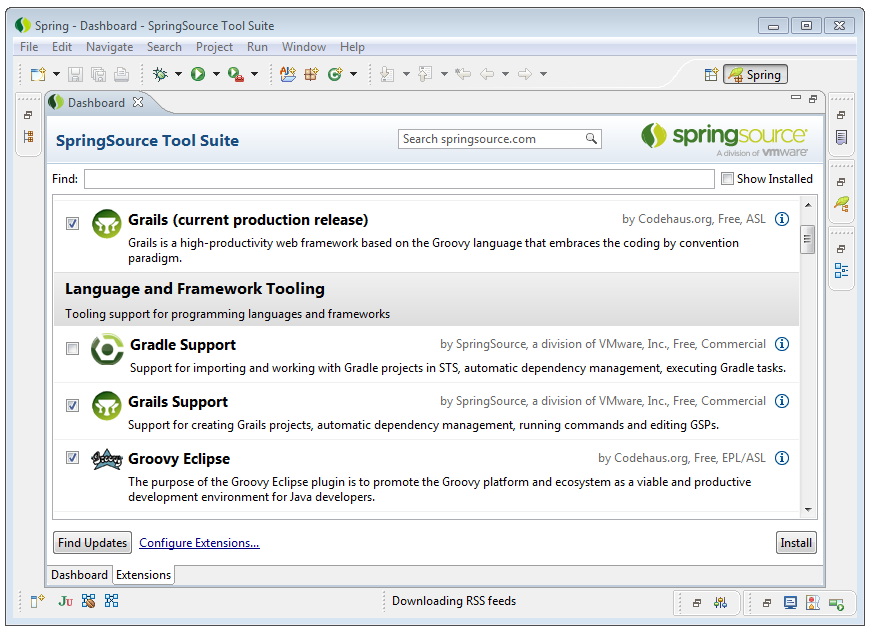
    • 3 plugins need to be installed. Open your Eclipse STS, go to Dashboard and click on Extensions tab.
    • Select "Grails (current production release)", "Grails Support" and "Groovy Eclipse" and click on Install button. 

That is all you need for this tutorial and maybe also for development of your Vaadin / Grails applications. 

Let's create a project called "vaadin-grails-hello-world". It is going to be Grails project. 


Dependencies and plugins are downloaded after we click on Finish button. It can take a while... and this is how a new Grails project looks like in Eclipse: 

Firstly, we need is to install Grails Vaadin plugin that will allow us to use Vaadin in Grails environment. Actually, we just open plugins window and click on the refresh button (so you get the list of latest plugins).


In case you don't see latest version in the plugins window, you can download the plugin from github and run this command. 
We should get this text in Eclipse console as the relsut of the successful instalation: 
| Loading Grails 2.0.1
| Configuring classpath.
| Environment set to development.....
| Installing zip vaadin-1.5.3.zip.....
| Installed plugin vaadin-1.5.3
| Resolving plugin JAR dependencies.....
| Plugin installed.
and VaadinConfig.groovy file should appear.
If that is not working, here is a good tutorial how to install that plugin: https://github.com/ondrej-kvasnovsky/grails-vaadin-plugin/wiki.  


Now, 4 simple steps are needed to get our Vaadin application working.

1. Set grails-app\vaadin folder as a source folder

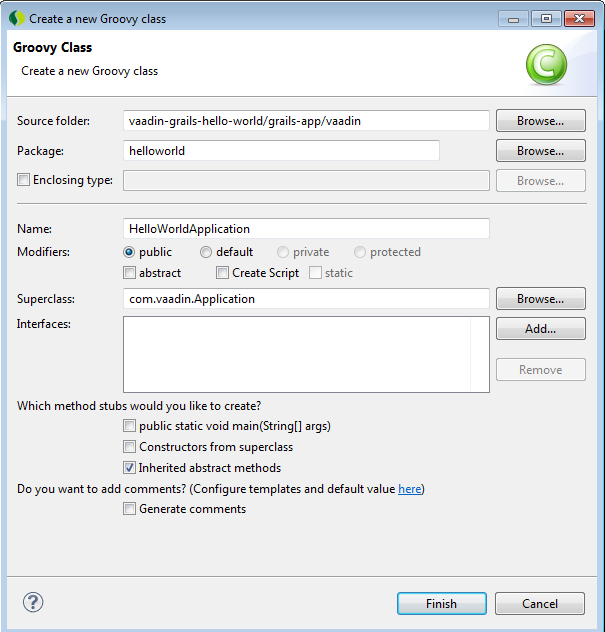
2. Create your Vaadin application class. Let's call it HelloWorldApplication.groovy in "helloworld" package. 

3. Make a note about HelloWorldApplication to VaadinConfig.groovy: 
applicationClass = "helloworld.HelloWorldApplication"

4. Remove content of mappings field in UrlMappings.groovy.


Good job if you came that far! As a reward, let's write some code in Vaadin. The first thing we could do is to make an empty page, where only a title is going to be set.

package helloworld
import com.vaadin.Application
import com.vaadin.ui.Window
class HelloWorldApplication extends Application {
@Override
public void init() {
Window w = new Window("Hello world!")
setMainWindow(w)
}
}

Let's test it. Click on Grails icon in your eclipse and write the following command that will run your application in development environment: dev run-app

This is how your application should look like:

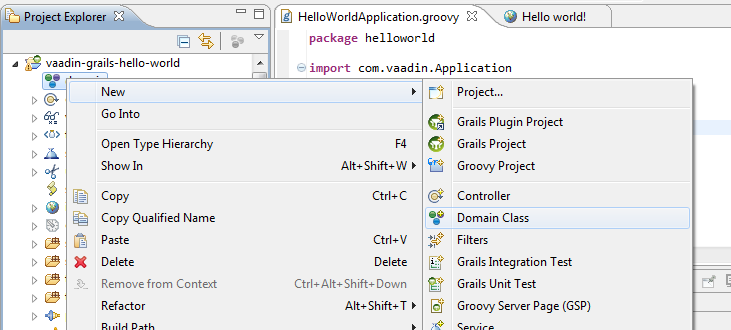
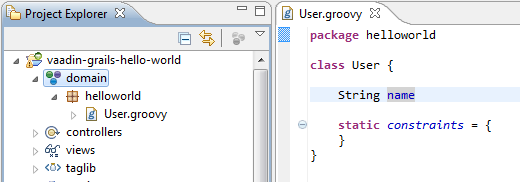
Well, our Vaadin application is running but we want to connect it with database and display some data. It is pretty simple in Grails. Just create a domain class e.g. helloworld.User and put there a variable called name.

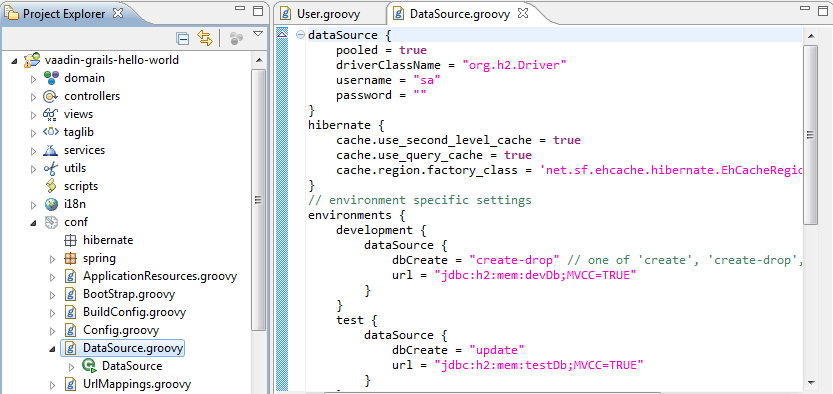
What we have done? We have made User class which is connected to database via Hibernate. If you wish to change database setting, go to DataSource.groovy (you don't have to, it is going to work by default setting).

Let's insert dome users before the application is started. This has to be done only when running the application in development mode. Here is the way how to do it (BootStrap.groovy):

Let's display these users in our application (HelloWorldApplication.groovy).
Let's start the application and see if the users are displayed...

Congratulations if that works! Just little note: if you make some little changes in your code then your code is recompiled and you don't have to restart the server (just refresh the web page ;-) ).

What now? You can go to see Vaadin sampler, read Vaadin book and start coding your Vaadin application.

You can get source codes on github.

TextLab for Mac
Ultimate application to validate, clean and format JSON, XML, SQL, HTML.

Friday, January 20, 2012

Grails, listDistinct and pagination

A beautiful red box in Grails documentation says that pagination doesn't work when using listDistinct() method. One should rather use HQL for pagination. Well, I have wrote really huge query using createCriteria().listDistinct() and the citation below caused me almost heart attack. 
The listDistinct() method does not work well with the pagination options maxResult and firstResult. If you need distinct results with pagination, we currently recommend that you use HQL. You can find out more information from this blog post.
I could rewrite it to HQL but the query I wrote is really heart of the system. So, it could take me few weeks to rewrite it and I don't have time and energy to do it. I am willing to scarify a bit from performance of the system. 

I have discovered the solution described below. It is not the best one from performance point of view, BUT it works and it is not causing high consumption of memory (there are thousands of records in DB nowadays and it works well). 

class ResponseService {
  def load( def params ) {
    def idList =  Response.createCriteria().list {
      projections { distinct ( "id" ) }
      // here are your restrictions...
      // e.g. eq( 'name', parameter.name )
    }
    if( idList ) { 
      // define range startIndex..usedMax
      int idListSize = idList.size()
      int usedMax = params.startIndex + params.max - 1
      def usedIds
      if( usedMax >= idListSize ) {
        usedMax = idListSize
      }
      // select only IDs we want to fetch 
      usedIds = idList[ params.startIndex..usedMax ]
      // fetch all Responses based on selected IDs
      def results =  Response.getAll( usedIds )
      return results
    }

  }
}
These resources inspired this solution: 
TextLab for Mac
Ultimate application to validate, clean and format JSON, XML, SQL, HTML.

Tuesday, January 10, 2012

How to interview Java developers

Three years of interviewing Java developers and I am about to write it down... here it goes, here is my way of doing interviews.

Step 0
Make a little preparation. I usually create a template for the interview - so my interview has desired meaning and all my questions are answered. Here is an example of my template: 
Past: [what he has done so far?]
Present: [what is he doing nowadays?]
Future: [plans for future?]
Rating: [areas like OOP, Java are rated, use your own scale]
Salary: [salary expectations]
Start date: [possible start date given by the applicant]
Notes: [something to remember the person]

I store all of these notes in my personal wiki provided by my company. So I can go back to my notes whenever I need. 

Step 1
Introduction is fine as the first step. As interviewer you get info about the applicant. The applicant should know what is your role in the hiring process (are you manger, java developer, architect...). But, don't waste time with this that much, there are more important things to discuss. 

Step 2
I usually ask developers questions related to these topics: OOP, Design paterns, Java, SCM and frameworks. But how to find what to ask first or where to put more focus on? I usually ask for the biggest project the applicant has participated. If there is some, then I ask how he did it? What was at the beginning of development - has he started coding immediately or is he used to do some design work? What about requirements and some specification? What about GUI protype? Is he using SCM? What design patterns were used and why? What frameworks does he know? Does he know the Java language? Here are few question (it might be beneficial): 
  1. What is an interface and you can use it during coding?
  2. Have you used an interface? If yes, how?
  3. What is the difference between List and Set collection classes?
  4. Do you draw class diagrams before you start coding? If yes, give him an example - so he is forced to draw UML class diagram. After he is done, give him Eclipse or Netbeans and ask him for implementation of his diagram.
  5. Do you use JUnit? What about mocking?
  6. Do you prefare work on back-end or front-end? 
  7. What design patterns have you used and how?
The answers for these questions are signs which will tell you where to dig in. If the application is not using design patterns, then you should be interested if he knows how to implement class diagrams and if he knows something about OOP. On the other hand, if the applicant knows nothing about SCM - then you can just rate it as 0 and continue with other areas. 

By the way, if the application's answers are satisfactory and I like the project, I ask for the link where I could download or use it. 

Step 3
At this stage, you should have enough info to ask practical question. An example: let's say that the applicant told you that he has used design patterns in last project. Let's ask him "What design patterns have you used?". The answer might be "Composite and Singleton". "Hurray! I will let him to analyse a problem with tree structure and if that goes well, he could code it. If not I will let him implement the singleton pattern!", scream your brain with delight. 

Let your applicant to choose programming IDE (usually Eclipse or Netbeans). So he is not limited by a tool and he can be as efficient as possible. 

If your participant is not able to analyse and code all that what you gave him... let him to code some loop and sum some values from a field. You can also try to force him to write a unit test. 

Well, this is the most interesting part of interview. You can see your applicant solving issues and explaining stuff under stress. There is nothing better what could help you to see what kind of person the application is and how he is going to behave in your team or company. So, keep your eyes and mind open! 

Step 4
Ask for expected salary and start date (at least these two are quite mandatory). You can also ask what is he doing in his free time. If he is playing chess and practising fight art, I am pretty sure you will remember him.

Tips
Don't forget that the applicant is nervous. So ask the questions properly and rather slowly.
Don't help him too much. He should solve the tasks you are giving to him. Your task is to watch and analyse how he is proceeding. 
Give the same easy questions to junior and senior. So you are able to compare applicants in long term perspective. I like when seniors have to answer simple questions about programming - so I can see how good they are at explaining things.
An example of my notes:   
Past: high school, worked also for company XYZ as Java developer
Present: looking for job
Future: wants to be architect
Rating: OOP: 2, UML: 1,5, Coding in IDE: 2, Java: 3, Frameworks: Hibernate, Spring
Salary: 10 000$
Start date: 24.12.2012
Notes: plays guitar and online games, practising box in free time
TextLab for Mac
Ultimate application to validate, clean and format JSON, XML, SQL, HTML.
Flavour of blaming culture

Running and enjoying blaming culture in your company? It seems that blaming is easiest and most useless thing one could do while working on a project. 

What one might achieve with that kind of culture? It has got quite many "benefits" actually. Let's have a look at short example.
Johny has started to work as project manager on a brand new project. Scope of the project was to develop a software for a big shop. As we all know, there are always issues to be solved on a project and Johny has been working on them day by day. Time has passed and unfortunately, project deadline has not been met. "What a brilliant idea to find a victim" thought the project owner. It was enough to have just one meeting between project owner and sales guy to agree that the reason behind this all (delay, angry customer...) is Johny. Johny has been fired from the project and new, better and experienced project manager has been employed.  
One might argue "and what about follow-up discussions, steering groups, continuous feedbacks... it could help to solve Johny's problem", well, it could help but it didn't happened in the example. And maybe something even more, that is not something what these blamers are looking for. They need to find a person which is behind all the problems. Reasons, lessons learned and root causes are not needed actually.

So what do they get with this approach?
  • New project manager gets
    • Hero status
    • Inheritance of delayed project
    • Possibility and energy to make changes, because of his "fresh blood"
  • Project owner gets
    • Excuse why project is loosing money, because Johny did it wrong... of course. 
    • Solution for the upper management "Johny project manager is fired, don't worry we have got a new one! So everything is going to be fine."
  • Sales guys gets
    • Reason why everything went wrong (again Johny the project manager). 
    • Improvement for customer "The new project manger is better. You might expect pure gold since now." 
  • Johny (the old project manager) gets
    • Frustration 
    • No feedback, thus no improvement
    • Great experience with blaming culture 
How could we work in better way? So we all are really enjoying work with others in our company? 
  1. Don't blame others! It really doesn't help. Take constructive approach in action.
    • If you blame, you look like little child screaming on playground at your mom "heee has took me my paaail, tell him to returnt it back to meeee". 
    • Yes, blaming is awkward. 
  2. Give feedback
    1. Say honestly what is wrong, what is bothering you and give others feedback in this simple way. 
    2. You should do periodical feedback surveys - so you recieve feedback on a person not by supervisor, but by his/her colleagues and subcordinates. 
    3. If you are not sure how to give a feedback, use the google. 
  3. Believe that people want to enjoy work and beneficial collaboration with others. 

Friday, December 23, 2011

Vaadin 7

New version (Vaadin 7 alpha 1) of Vaadin has been released! If you are not aware of Vaadin roadmap, here you are: https://vaadin.com/roadmap


What has been changed so far?

  • Redesign of the window and application APIs
    • Multiple browser tabs (and windows) are supported by default
    • Faster startup
    • Customized UI starting from the first request
  • Redesign of forms and data binding (dev info)
    • Form is deprecated
    • CustomField, converters, validators  and typed properties using Java generics added

Vaadin is great framework with great documentation. So here is the little tutorial about new features: https://vaadin.com/wiki/-/wiki/Main/Vaadin+7 

If you feel like you might want to comment on these changes, visit these links:

TextLab for Mac
Ultimate application to validate, clean and format JSON, XML, SQL, HTML.